

Background Data Extractor
Data Extractor powered by LEVVA

Software to account for invoices automatically with AI

Data Extractor digitizes, extracts, classifies and prepares invoice and document data so your team reviews fewer repetitive tasks and connects the result with its ERP.

What does Data Extractor automate?

It automates document reading, key-field extraction, accounting classification and data export toward your ERP or internal business software.

Upload documents in seconds

Upload invoices, receipts, delivery notes and other documents in PDF, JPEG or PNG. The platform organizes each file so AI can process it with traceability.

Subida de documentos

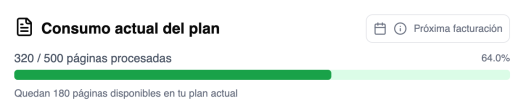
Control volume and status

Monitor document usage, processing status and results waiting for review from a clear dashboard.

Consumo de plan

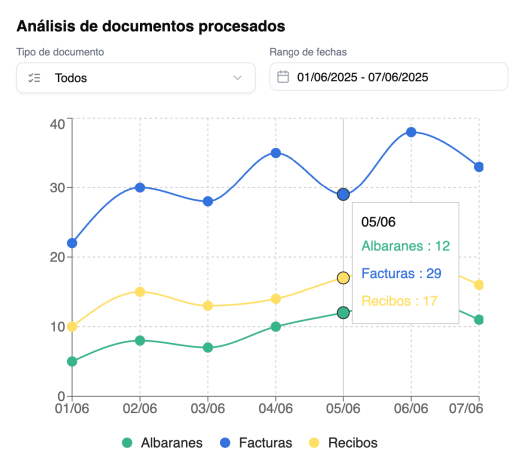
Analyze document data

Visualize invoice, amount, supplier and activity metrics to detect patterns, review workload and improve document management.

Análisis detallado

Extract and classify with AI

Data Extractor identifies key fields, classifies each document and prepares the information for validation before sending it to your ERP or accounting workflow.

Procesamiento IA

Optimize your document management with AI

Learn more about Data Extractor
AI document management

Document types Data Extractor can automate

The platform is designed for teams that receive documents continuously and need to turn them into reliable data without manual entry.

  • Incoming and outgoing invoices
  • Tickets, receipts and expenses
  • Delivery notes, orders and annexes
  • PDF, images and scanned documents
ERP integration

Data ready for your ERP, accounting software or internal system

Data Extractor prepares information for export or connection with each company's workflow. The integration is defined according to the ERP, accounting rules and review level your team needs.

  • Structured export
  • API and custom connectors
  • Company-specific rules
  • Review before sending
Security and control

Document automation with traceability and human criteria

AI speeds up the work, but control stays with your team. Each document can be reviewed, organized and traced before it enters critical systems.

  • Controlled access
  • Document traceability
  • GDPR-adaptable workflows

Workflow: from received document to validated data

A clear process so administration, accounting and operations teams work with less friction.

  1. 1

    Upload

    Upload documents individually or in batches from the Data Extractor panel.

  2. 2

    Extraction

    AI identifies key fields and turns the document into structured data.

  3. 3

    Validation

    Your team reviews alerts, sensitive fields and rules before export.

  4. 4

    Export

    Data is ready for ERP, accounting software, reports or internal processes.

Frequently asked questions about Data Extractor

Quick answers to decide whether it fits your document and accounting workflow.

Turn your invoices and documents into data ready to use

Show us your current workflow and we will show you how Data Extractor can automate the repetitive part without losing control.

WhatsApp